The AI works out the job. Your prices work out the cost.
Five steps from a customer’s question to a yes, each shown on the screen where it happens.
01Ask
Meet the customer where they already are.
Share your quote link or QR code, send it in WhatsApp, or put the same form on your website. Each service asks only the questions that set its price, and for the photos it needs. A blurry or dark photo is caught before it is sent.
qolumns.com/quote/example-home-services
Instant estimate
Example Home Services

Water Heater Replacement
Where is the water heater?
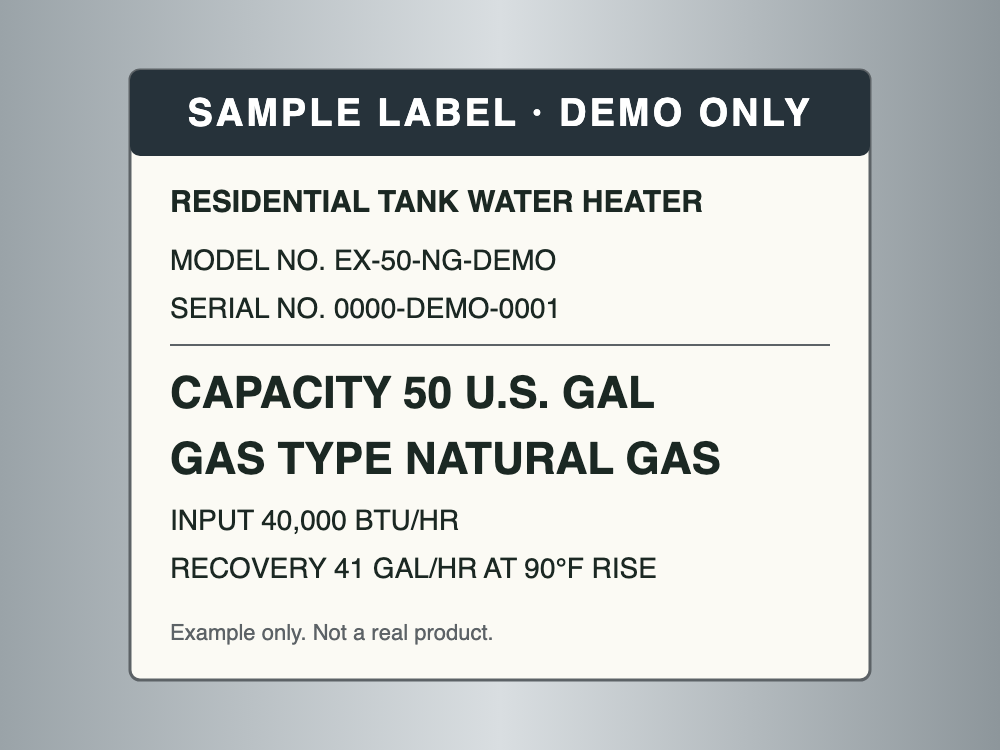
Tank rating label
 1 photo added
We read 50 gal from your tank's rating label. Is that right?
02Read the job
It reads the details that set your price.
From the answers and photos the AI reads what the job is: the capacity on a tank label, the size on a rating plate, the rating on a panel, the wall area of a house. A reading that changes the price goes back to your customer to confirm. When it can’t tell, they see a range and one quick question.
03Price
Plain English in. Your prices out.
Describe your pricing the way you’d tell a new hire: “$375 per room, heavy prep adds $250.” It becomes your price list, shown back to you to check. The AI works out the job; the cost only ever comes from the prices you set.
Check your prices
Interior painting
$375 per room, heavy prep adds $250.
- Per room$375.00
- Heavy prep+ $250.00
04Confirm
An estimate page, and you have the last word.
Your customer gets a page in your branding with the estimate for their job, straight away. By default they can accept once you’ve confirmed it: one tap on Approve & send. You choose per service: show the estimate and confirm, hold it until you approve, or send automatically. They can accept, ask a question or decline, and it shows in your dashboard straight away.
Estimate prepared for Megan G.
EST-2026-0142
Your quote
$2,150.00
Reviewed and confirmed by Example Home Services.
Price breakdown
05Track
See what’s winning work.
Home shows what’s waiting for you, where every quote stands, and the last 30 days: requests, estimates sent, accepted and their value.
Last 30 days
Compared with the 30 days before.
Requests
42
up 6
Estimates sent
38
up 5
Accepted
17
up 3
Value accepted
$41,300
up $7,850
See it price one of your jobs.
The fastest way to judge it: set up your prices and send yourself a test quote.